How a Packet Leaves a Pod
Follow one packet from a pod on EKS, through the node and the VPC route table and out one of three doors, with what each door costs and the GKE equivalents.
- #kubernetes
- #eks
- #networking
- #vpc
- #aws
- #cloud-cost
A pod at 10.0.3.47 opens a connection to S3 in its own region. One packet, one destination. Depending on a row in a route table that the pod never sees, that packet reaches S3 for nothing, or it costs $0.045 for every gigabyte that follows it.
I want to walk that packet out of the pod one step at a time. A box-and-arrow diagram of EKS networking tells you what is connected. It does not tell you which arrow you are being charged for, or which one breaks when a security group changes. If you can follow a single packet from the container's network interface to the far side of the VPC, the networking, the security rules and the AWS bill stop being three separate subjects.
Everything here is EKS with the Amazon VPC CNI, with prices taken from the AWS price list for us-east-1 in October 2026. The first part is Linux and applies on any cloud. The last part sets the same ideas beside GKE.
What the packet starts in
A pod is a group of containers that share one network namespace. A network namespace gives the processes in it their own network devices, their own IP stack and routing table, their own firewall rules and their own port numbers. That is why eth0 inside a pod belongs to the pod alone, and why two pods on one node can both listen on port 80.
The namespace has to be wired to the rest of the node, and the wire is a veth pair. veth devices always come in connected pairs, and a packet sent on one end is received immediately on the other. One end lives inside the pod's namespace and is named eth0. The other stays in the node's namespace. The CNI plugin builds this when the container runtime sets the pod up.
What differs between CNI plugins is the next question: where does the pod's address come from? The Amazon VPC CNI takes it from the VPC itself. EC2 attaches network interfaces to the node, each with a set of secondary private IP addresses. A daemon on every node, ipamd, which runs as the aws-node DaemonSet, keeps a warm pool of those addresses and gives one to each new pod. So 10.0.3.47 is a real VPC address that belongs to one of the node's interfaces, and anything in the VPC can address it directly.
That is also what limits how many pods fit on a node. An interface can only hold so many addresses. The documented formula is the number of interfaces, times the addresses per interface minus one, plus two. A c5.large has 3 interfaces with 10 addresses each, which gives 29 pods. Prefix delegation changes the unit: the CNI assigns a /28 prefix, which is 16 addresses, where it would have assigned one address.
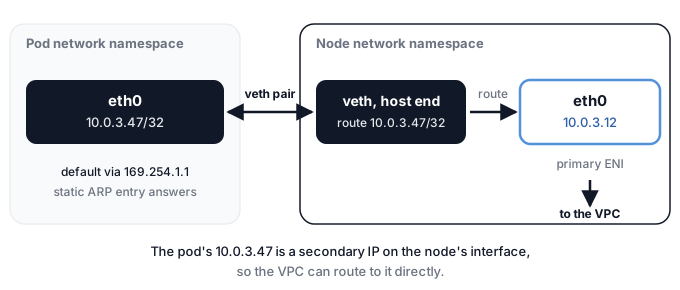
Inside the pod the routing is deliberately minimal. This is a sketch of what the CNI's design document and source describe:
pod network namespace
  eth0         10.0.3.47/32
  route        default via 169.254.1.1 dev eth0
  route        169.254.1.1 dev eth0
  neighbor     169.254.1.1  static ARP entry
The pod's address is a /32, so it shares a subnet with nothing, and every destination goes via a gateway. That gateway, 169.254.1.1, is a dummy. Nothing owns it. The CNI plants a static ARP entry so the pod can resolve it without asking anyone, and the packet goes straight down the veth into the node. The CNI's source says it does this because the host runs in routed mode and the container needs the entry to find its default gateway. There is no bridge. On the node, a /32 route per pod points back down the right veth.
From there the packet follows the node's ordinary routing. A destination inside the VPC leaves through the node's interface with the pod's own address as the source. A destination outside the VPC's ranges gets a source address rewrite on the way out. That rewrite is the first of three, and I'll come back to it under the NAT gateway.
Looking at it on a real node
None of this is hidden. Inside a pod, from an image that has the ip tool:
kubectl exec POD -- ip addr show eth0
kubectl exec POD -- ip route
You should see the /32 address and the dummy default gateway. On the node itself:
ip route | grep eni
ip rule show
sudo iptables -t nat -S AWS-SNAT-CHAIN-0
The first lists a route per pod through its veth, whose host-side name starts with eni by default. The second shows the rule priorities above. The third prints the source rewrite chain, which in the current source holds a RETURN rule for each of the VPC's address ranges, followed by a SNAT to the node's primary address. The chain name comes from the current source and may differ in your CNI version.
When the pod's address isn't a VPC address
Everything so far assumes the pod's address is real: the VPC knows it, a route can match it, and a flow log can record it. That is a choice the CNI makes, and not every CNI makes it.
An overlay CNI keeps pod addresses in a separate address space that the underlying network knows nothing about. When a pod sends to a pod on another node, the CNI wraps the whole packet inside a new packet addressed from one node to the other, and the receiving node unwraps it. That wrapping is called encapsulation. The cloud network only ever sees node-to-node traffic. Calico's documentation describes it as an outer packet that the underlying network knows how to handle, for example one addressed by node IPs, and Cilium's says the network connecting the nodes does not need to be made aware of the pod ranges.
Step through it to see what the packet looks like at each point. The addresses are illustrative, with an overlay range of 10.244.0.0/16 that the VPC has never heard of.
The trade runs in both directions.
- What you gain. Pod addresses don't use up VPC address space. AWS says Calico's own networking conserves IP addresses from the underlying VPC, and Calico recommends an overlay when running out of VPC range makes allocating pod IPs from it a problem.
- What it costs. The wrapper takes bytes. Calico documents 50 bytes for VXLAN and 20 for IP-in-IP. On an underlay with a 1500 byte MTU that leaves a pod 1450 or 1480, and on AWS's 9001 byte jumbo frames it leaves 8951 or 8981. Wrapping and unwrapping also costs a small amount of CPU. Cilium notes that jumbo frames soften the byte overhead, which is 50 bytes on each 1500 byte packet but only 50 on each 9000.
- What you lose sight of. In native mode the cloud's own tools see the pod. Security groups attach to the interface that carries the pod's address, AWS documents that the packet source address in a flow log record can be a pod's address and not the node's, and GKE firewall rules can target pod ranges directly. With an overlay the cloud network sees node addresses, so its rules and logs match nodes. That last step is an inference from how encapsulation works, because neither cloud documents it directly.
Calico's own advice is to avoid an overlay where you can. It says running without one is generally preferable, because the packet that leaves your workload is the packet that goes on the wire, and it offers a cross-subnet mode that encapsulates only the traffic that crosses a subnet boundary.
If the reason for wanting an overlay on EKS is running out of addresses, AWS documents two answers that keep pods native. The first is custom networking. You add a secondary CIDR block to the VPC, describe subnets in it with an ENIConfig resource, and set AWS_VPC_K8S_CNI_CUSTOM_NETWORK_CFG to true. The CNI then creates the node's secondary interfaces in those subnets and gives pods addresses from them. AWS recommends taking the secondary block from 100.64.0.0/10, the shared address space in RFC 6598, because it is less likely to clash with a corporate network. The cost is density. The node's primary interface no longer hands out pod addresses, so fewer pods fit, and AWS suggests prefix delegation alongside it. The primary interface still carries host-network pods and does the source rewrite for traffic leaving the VPC. The second answer is IPv6. Custom networking does not work with IPv6 clusters, and AWS's own advice is that if address exhaustion is the only reason for custom networking, an IPv6 cluster is the alternative.
On EKS, the VPC CNI is the only CNI AWS supports on EC2 nodes. You can install an alternate one, but AWS recommends commercial support or in-house expertise, and it isn't possible on Fargate or in EKS Auto Mode. Calico runs on EKS in both ways, as a policy engine over the VPC CNI or as the CNI itself with an overlay. In the second case Calico's documentation warns that the control plane cannot initiate connections to pod addresses. Anything the control plane must call, such as an admission webhook, then needs hostNetwork: true. That is the control plane path from later in this article meeting an overlay.
The first stop is a route table
Once a packet is out of the node, it reaches the VPC with a destination address and nothing else to go on. What happens next is decided by one thing, the route table of the subnet it came from.
A route table is a short list. Each row has a destination range and a target. When a packet arrives, the VPC picks the row with the most specific range that contains the destination address. AWS calls this longest prefix match, and it is the same rule every router uses.
A private subnet on EKS usually has three kinds of row.
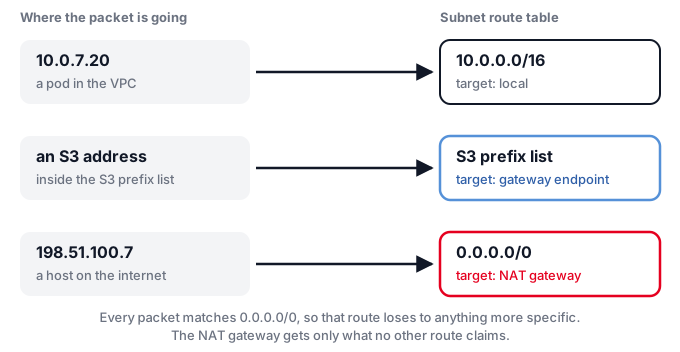
The first row is the VPC's own range, with the target local. Anything inside the VPC stays on the VPC network, other pods included. The last row is the default route, 0.0.0.0/0, pointing at a NAT gateway. Every address on earth matches it, which is exactly why it loses to anything more specific. In the middle is a row whose destination is not an address range at all. It is a prefix list.
That gives three doors, and the packet's destination picks one. An address inside the VPC stays inside. An address in the S3 prefix list goes through a gateway endpoint. Everything else goes to the NAT gateway. Each one is priced differently, and the price follows the shape of the door, so I'll take them in turn. A fourth path runs the other way, from the control plane into your nodes, and I'll leave that for after.
Door one: the gateway endpoint
A gateway endpoint is the cheapest door, and the reason is easy to miss. It isn't a device.
AWS offers gateway endpoints for S3 and DynamoDB, and for S3 Express One Zone. When you create one, you choose route tables, and AWS adds a row to each of them: the service's prefix list as the destination, the endpoint as the target. That is the whole mechanism. There is no network interface, no instance to size or patch, and AWS states plainly that there is no additional charge for using one.
The pod does not know any of this happened. It keeps addressing S3 by its normal public name, and the AWS documentation is explicit that instances reach the service through its public endpoint even over a gateway endpoint. Only the route changed.
One consequence matters if you write bucket policies. S3 now sees the sender's private VPC address instead of a public one, so a condition on aws:SourceIp stops matching those requests. The documented replacement is aws:VpcSourceIp, or a condition on the endpoint or VPC ID.
Door two: the interface endpoint
Every other AWS service that offers private access does it with an interface endpoint, which is AWS PrivateLink. This one is a thing you can point at.
For each subnet you choose, AWS creates a network interface in it and gives it a private IP from that subnet's range. You can pick one subnet per availability zone. Because the address is inside your VPC range, a packet to it matches the local row and never gets near the NAT gateway.
That leaves one problem. The pod calls the service by its usual public name, so something has to make that name resolve to the endpoint's private address instead. That is what private DNS does. When you enable it, AWS creates a hidden private hosted zone containing a record for the service's regular name, and the record resolves to the private IPs of the endpoint interfaces. Code that was already calling the public regional name now lands on the endpoint with no change.
How a pod's query reaches that hidden zone is worth knowing, because it is the other place this can go wrong. A pod's default DNS policy is ClusterFirst, which means a name outside the cluster domain is forwarded by the cluster's DNS server to an upstream resolver. In a standard setup that ends at the VPC's own resolver, which is what answers from the private hosted zone. AWS documents that resolver at the VPC's base address plus two, and at 169.254.169.253, and it also documents a limit of 1,024 packets per second for services that use link-local addresses, shared between DNS queries and instance metadata requests. Heavy DNS traffic is one way to meet it.
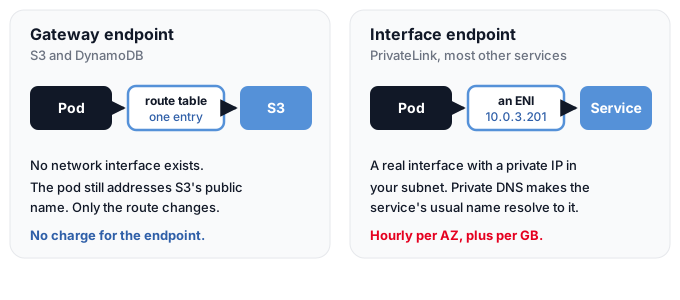
The price follows the shape. An interface endpoint costs $0.01 per endpoint per availability zone per hour, and $0.01 per GB processed for the first petabyte each month, with lower rates above that. The NAT gateway charges an hourly fee and a per-GB fee too. The endpoint is far cheaper per gigabyte, but you buy one per service per zone, and several hourly fees add up when a cluster needs several services.
Door three: the NAT gateway
The default route takes everything the other rows don't claim. That means the public internet, and any AWS service that has no endpoint in your VPC.
A public NAT gateway sits in a public subnet and has an Elastic IP. The internet gateway maps the NAT gateway's private address to that Elastic IP on the way out.
For a pod, the source address is rewritten three times, and the first rewrite happens before the packet is ever in the VPC.
The first rewrite is on the node. When a pod talks to an address outside the VPC's CIDR range, the VPC CNI translates the pod's address to the primary private IP of the node's primary network interface. The second is at the NAT gateway, which AWS documents as mapping the source to its own private address. The third is at the internet gateway, which maps that private address to the Elastic IP. Replies are translated back the same way.
Two details from the same documentation are worth knowing. Pods that use hostNetwork are not translated, because they already carry the node's address. And if you set AWS_VPC_K8S_CNI_EXTERNALSNAT to true, the node stops translating and leaves it all to the NAT gateway.
The S3 prefix-list addresses are outside the VPC's CIDR range as well. By the same rule, the first rewrite applies to S3 traffic even though it never touches the NAT gateway. S3 documents that it sees a private VPC address from an endpoint, and with the default settings that address would be the node's, not the pod's. That last step is my reading of the two documents together, not a sentence from either.
What the NAT gateway costs
In us-east-1 a standard NAT gateway costs $0.045 an hour and $0.045 per GB processed. The per-GB charge applies whatever the traffic's source or destination. AWS's own worked example is close to a pod's case: an instance behind a NAT gateway sends 1 GB to an S3 bucket in the same region. There is no S3 or EC2 data transfer charge, and the bill is $0.045 for the gigabyte the NAT gateway processed. The same page notes that a gateway endpoint would avoid that charge.
Three more charges attach to the NAT gateway, and they are easy to forget because they live on other line items:
- The Elastic IP. AWS charges $0.005 an hour for each in-use public IPv4 address, and a public NAT gateway needs one.
- Internet egress. Data going out to the internet is charged separately, at $0.09 per GB for the first 10 TB a month after a 100 GB monthly allowance that is shared across all services.
- Cross-zone transfer. If a pod in one availability zone uses a NAT gateway in another, $0.01 per GB in each direction applies on top. AWS's own advice is to keep resources in the same zone as their gateway, or to run one in each zone.
The path that starts on the other side
One path runs the opposite way, and it is the one that gets forgotten because nobody deploys anything for it.
The EKS control plane lives in an AWS-managed account, outside your VPC. When you create a cluster, EKS creates 2 to 4 network interfaces in the subnets you specify. The EKS best practices guide calls them cross-account ENIs. The API server uses them to reach your nodes, and the commands that depend on them are the ones that go to the kubelet: kubectl exec, logs, attach, cp and port-forward.
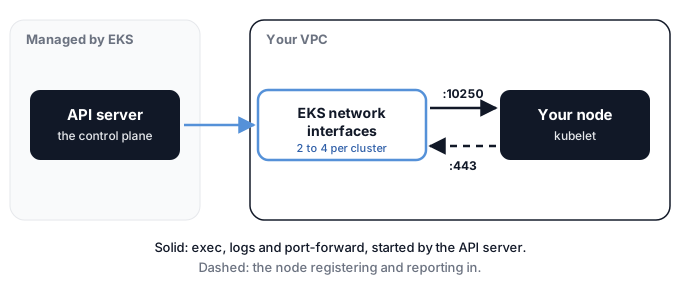
The ports are in the security group rules. The cluster security group, which is attached to those interfaces, needs outbound TCP 10250 to the nodes, which is the port the kubelet listens on, and the nodes need outbound TCP 443 back to the cluster. So exec and logs are started by the API server and enter your VPC through those interfaces, while a node registering itself and reporting in goes the other way, out to the API server's endpoint.
How the node finds that endpoint depends on the cluster endpoint access mode:
| Mode | How nodes reach the API server |
|---|---|
| Public only, the default | Traffic leaves the VPC but not Amazon's network. Nodes need a path to the internet gateway or a NAT gateway. |
| Public and private | Inside the VPC the endpoint name resolves to private addresses, through a private hosted zone EKS creates for you. |
| Private only | All access must come from inside the VPC or a connected network. |
The private endpoint is not a PrivateLink endpoint, even though it behaves like one. AWS says it is not a traditional PrivateLink endpoint and that it does not appear in the VPC console's endpoint list.
The part that is not free
It is tempting to treat all of this as included in the cluster fee, which is $0.10 an hour for standard support, or $0.60 an hour for a cluster on a Kubernetes version in extended support. The cluster fee does not cover the data. AWS says EKS absorbs the data transfer cost on the control plane side of those interfaces, and that you are charged standard AWS data transfer rates for traffic on your side, in both directions between the nodes and the control plane.
Same-zone transfer is free and cross-zone is $0.01 per GB in each direction. AWS does not work out the per-case amounts for this path, so which rate applies to a given node, probably depending on whether its zone has one of the interfaces, is a reasonable guess and not a documented fact. The volume is usually small. Whether yours is small is a number to look at on the bill rather than to assume.
An image pull, end to end
An image pull ties the three doors together, because it uses all of them.
Take a node in a private subnet with no NAT gateway and no route to the internet, pulling an image from a private ECR repository. The EKS documentation for private clusters lists three endpoints to create for that: ecr.api, ecr.dkr, and an S3 gateway endpoint.
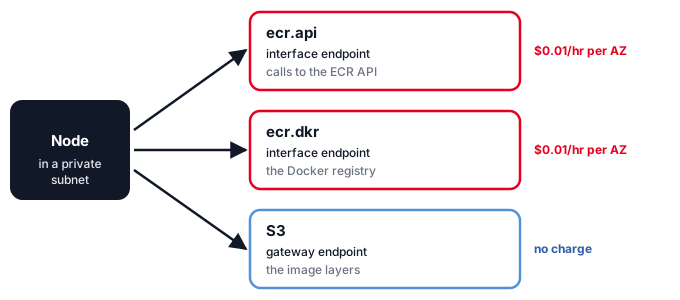
The S3 one surprises people. The reason is in the ECR documentation: ECR stores image layers in S3, so a pull first asks ECR for the image manifest and then downloads the layers from S3. The two interface endpoints cover the registry side. The gateway endpoint covers the layers, which hold the image contents, and it costs nothing.
That split is the useful part of the example. The interface endpoints cost an hourly fee per zone whether or not anyone is pulling. Two endpoints across three zones is six endpoint-hours for every hour that passes. The layers take the free door.
A few details that decide whether it works:
- Two different hostnames. API calls go to
api.ecr.<region>.amazonaws.com, and the registry itself is<account>.dkr.ecr.<region>.amazonaws.com. The general reference says you must use theapi.ecrname when going through a PrivateLink endpoint. - Private DNS must be on. The EKS documentation recommends it for every endpoint, so workloads keep using the public names. For
ecr.dkr, the ECR documentation says it is required. - The endpoint security group must allow 443 from the private subnet, or the pull hangs rather than fails.
- Pull-through cache is the exception. The same ECR page says that pulling through a pull-through cache rule needs a public subnet in the same VPC with a NAT gateway, so check that before building a fully private design around it.
What each path costs
All of these are us-east-1 prices from the AWS price list in October 2026, and they will move. The table is a map of the shape of the bill, not a quote.
| Path | Fixed cost | Per GB |
|---|---|---|
| Inside the VPC, same zone | none | none |
| Inside the VPC, across zones | none | $0.01 each direction |
| Gateway endpoint, S3 or DynamoDB | none | none |
| Interface endpoint | $0.01 per hour, per zone | $0.01, first PB each month |
| NAT gateway, standard | $0.045 per hour, plus $0.005 per hour for its Elastic IP | $0.045 processed, plus $0.09 for internet egress beyond the free allowance |
| Internet gateway | none | none, but EC2 data transfer applies |
| EKS control plane | $0.10 per hour per cluster | standard rates on your side of the interfaces |
Multiplied out at 730 hours a month, the fixed parts look like this. The arithmetic is mine, from the prices above:
| Fixed item | Per month |
|---|---|
| One EKS cluster, standard support | $73.00 |
| One NAT gateway with its Elastic IP | $36.50 |
| A NAT gateway in each of three zones | $109.50 |
| ECR's two interface endpoints in three zones | $43.80 |
And one example for the per-GB side. Sending 10,000 GB a month to S3 through a NAT gateway costs $450 in processing charges. The same 10,000 GB through a gateway endpoint costs nothing. S3 request charges are separate and the same either way.
Finding it on your own bill
The bill already splits these paths apart. In Cost Explorer, group by usage type and look for the ones that name the doors. Many carry a region prefix such as USE1-, so match on the rest of the name:
NatGateway-HoursandNatGateway-Bytesfor the NAT gateway.VpcEndpoint-HoursandVpcEndpoint-Bytesfor interface endpoints.DataTransfer-Regional-Bytesfor cross-zone traffic.DataTransfer-Out-Bytesfor egress to the internet.PublicIPv4:InUseAddressfor the Elastic IPs.
If NatGateway-Bytes is large, the first question is what it carries. AWS-service traffic that could have taken an endpoint instead is the cheapest thing to find and to move.
Getting out without the per-gigabyte fee
At scale, the NAT bill is almost entirely the per-gigabyte processing charge. On Google Cloud the gateway's hourly part stops growing at 32 VMs, where it becomes a flat $0.044 an hour, so a thousand VMs cost about $32 a month in gateway hours. Processing 10 TiB at $0.045 per GiB costs $460.80, and 100 TiB costs $4,608. Past a modest size, the fee that scales is the one charged on every byte.
It sits on top of internet egress and does not replace it. Google lists data transfer out as a separate charge, and to North America the first paid tier is $0.12 per GiB, falling to $0.08 above 10 TiB a month. AWS's first tier is $0.09 per GB. So the processing fee adds a little over a third to Google's first tier, more than half to its cheapest one, and half to AWS's first. Every option below can remove the processing fee at most. None of them removes the egress charge.
They fall in rough order of how much you take on.
Keep the traffic off NAT. A Google API never goes through a Cloud NAT gateway. The Cloud NAT documentation says a Public NAT gateway never performs NAT for those addresses, and that Google automatically enables Private Google Access on the subnet ranges the gateway serves. With nothing translated there is nothing to process, though the pages don't say that in so many words. A Private Service Connect endpoint for Google APIs costs $0.01 an hour with no data charge. On AWS the same job is done by the gateway and interface endpoints from earlier. This is the cheapest cut for any traffic that has a private door.
Give NAT fewer addresses. A fleet with many nodes can run into a ceiling on public IPs, and that is usually a port question. Each Cloud NAT IP offers 64,512 source ports per protocol. At the static default of 64 ports per VM, one IP covers 1,008 VMs, which is the example in the documentation. Dynamic port allocation starts each VM at a default minimum of 32 ports, doubles it when a VM runs low, and defaults to a maximum of 65,536. By the same formula that is 2,016 VMs per IP at the minimum, though the documentation does not print that example. Ports are per VM and each distinct destination can use all of them, so the limit bites when one VM holds more simultaneous connections to a single destination than it has ports, and not when it holds many connections to many places. An IP costs $0.005 an hour, which is $3.65 a month. Shrinking the pool saves on addresses, not on bytes. On AWS, one IP supports up to 55,000 simultaneous connections to each unique destination.
Give each node its own public IP. There is no NAT gateway and no processing fee. A Google VM with an external IP does one-to-one NAT without Cloud NAT, and GKE's masquerade agent already rewrites a pod's address to the node's, so pod traffic should leave with the node's external address. That conclusion joins two documents and no single page states it. An in-use external address costs $0.005 an hour, and half that on Spot VMs. On AWS the same $0.005 applies per public IPv4 address, and the node's subnet needs a route to an internet gateway. The price is exposure and arithmetic. The nodes are directly reachable unless a firewall says otherwise, and one public IP per node is exactly what a quota on public addresses prevents.
Run your own NAT. On Google Cloud that means VMs with IP forwarding enabled and an iptables masquerade rule, reached through a static route whose next hop is the VM. Several VMs on routes of equal priority share traffic by ECMP, using a five-tuple hash. The documentation is blunt about what you take on: Google Cloud never checks whether a next hop instance is healthy, so there is no failover without a script or a load balancer.
A load balancer as the next hop does bring back a per-gigabyte charge. The pricing page lists $0.008 per GiB of data processed for internal passthrough load balancers, plus a forwarding rule from $0.025 an hour. It does not say which direction a NAT design incurs, so budget up to $0.008 in each. That is under a fifth of the Cloud NAT fee, and it is not zero.
A VM also caps what you can carry. Google documents about 7 Gbps of egress to the internet per VM without Tier 1 networking and 25 Gbps with it, and 3 Gbps for any single flow, whatever the machine size. On AWS, NAT instances are still documented but legacy. The NAT AMI reached the end of maintenance support in December 2023, AWS recommends gateways, failover is a script you write, and bandwidth depends on the instance type.
Put a proxy in front. For HTTP and HTTPS traffic, a forward proxy such as Squid or Envoy on VMs with static IPs costs the same as self-managed NAT and adds domain-level filtering and logging. It has the same per-VM egress caps and the same internet egress prices.
| Option | Per-gigabyte charge | Fixed cost | What you take on |
|---|---|---|---|
| Cloud NAT | $0.045 per GiB | $0.0014 per VM-hour, flat $0.044 above 32 VMs, $0.005 per IP-hour | Nothing |
| AWS NAT gateway | $0.045 per GB | $0.045 per hour, $0.005 per IP-hour | Nothing |
| A public IP per node | None | $0.005 per IP-hour, $0.0025 on Spot | Exposure, one IP per node |
| Your own NAT, routed to VMs | None | VMs and IPs | Failover, patching, bandwidth caps |
| Your own NAT behind a GCP load balancer | Up to $0.008 per GiB each direction | Adds a forwarding rule from $0.025 per hour | Patching, bandwidth caps |
What this trades is a metered fee for fixed costs plus operations. There is no volume at which it flips for everyone. At low volume the gateway's price is cheaper than the work of running your own, and at high volume it isn't. The crossover depends on your traffic, your bandwidth peaks and how much a failed NAT VM costs you, so work it out with your own numbers.
Seeing the doors yourself
Everything above is visible with a handful of commands. First, what a prefix list actually contains, and which route table a subnet uses:
aws ec2 describe-managed-prefix-lists \
  --filters Name=prefix-list-name,Values=com.amazonaws.us-east-1.s3

aws ec2 get-managed-prefix-list-entries --prefix-list-id pl-REPLACE-ME

aws ec2 describe-route-tables \
  --filters Name=association.subnet-id,Values=subnet-REPLACE-ME
The first returns the list's ID. The second prints every address range in it, which is the thing the gateway endpoint row stands for. The third shows the rows the packet is matched against, and you should be able to find all three kinds in it.
Then which endpoints exist in the VPC and what kind they are:
aws ec2 describe-vpc-endpoints \
  --query 'VpcEndpoints[].[ServiceName,VpcEndpointType,State]' --output table
The reference pages for prefix list entries and route tables list every option.
The same packet on GKE
Google has a counterpart for each door, and the places where they differ are the useful part.
A GKE cluster in the default VPC-native mode gives pods addresses from a secondary range on the node's subnet, called alias IP ranges. Unless you change the maximum, each node gets a /24 from that range, which supports up to 110 pods. Pod addresses are natively routable in the VPC. So, as on EKS, a pod has a real VPC address. The difference is the unit: a block per node, not individual addresses on interfaces, and no interface-count formula to hit.
Overlay is not how GKE works, and it is not a documented option. VPC-native is the default, and Autopilot always uses it. The older routes-based mode is not an overlay either. It adds a VPC route for each node's pod range with the node as the next hop, Google's tooling marks it as not recommended, and a cluster cannot be migrated between the two modes. GKE Dataplane V2 is Cilium-based eBPF. It is on by default in Autopilot and opt-in on Standard, and Google's documentation describes no encapsulation for it. What GKE documents for Calico is network policy enforcement, one of two mutually exclusive managed options next to Dataplane V2. Swapping in your own CNI as an overlay is not described anywhere in Google's documentation.
| EKS door | GKE counterpart | What to know |
|---|---|---|
| Gateway endpoint for S3 | Private Google Access | A subnet setting, not a route entry. It covers Google APIs generally. |
| Interface endpoint | Private Service Connect for Google APIs | One internal IP per API bundle, not an interface per service per subnet. |
| NAT gateway | Cloud NAT | Regional and software-defined. Billed per VM, not per gateway. |
| Control plane interfaces | Private Service Connect | Current clusters use it. Older private clusters used VPC peering. |
| Source rewrite on the node | ip-masq-agent | Different default exemptions, covered below. |
Three of these deserve a closer look.
The NAT price matches, the shape doesn't. Cloud NAT processes data at $0.045 per GiB, the same number as the AWS gateway's $0.045 per GB. The hourly part works differently. Cloud NAT charges $0.0014 an hour for each VM using the gateway, up to 32 VMs, and a flat $0.044 an hour beyond that, plus $0.005 an hour per external IP. And it is not in the data path at all. Google's documentation says the gateway and its router are a control plane, and packets don't pass through them. There is no appliance sitting in the path to size or place.
Private Google Access is the least exact comparison. Where a gateway endpoint adds a route, this is a flag on a subnet. With the default domains the traffic still goes to Google's public addresses over the default route, and stays inside Google's network. The VIP options, private.googleapis.com and restricted.googleapis.com, need your own private DNS zone. Google's pricing page lists no separate charge for it, but it never calls it free either, which is a different statement from AWS's flat one about gateway endpoints. Check before assuming.
The source rewrite differs more than you'd expect. On EKS the CNI leaves a pod's address alone only for destinations inside the VPC's own ranges. GKE's ip-masq-agent default leaves it alone for every private and reserved range: 10.0.0.0/8, 172.16.0.0/12, 192.168.0.0/16 and several more. So a pod reaching an on-premises 10.x network keeps its own address on GKE, and shows up as the node's address on EKS unless you add that range to AWS_VPC_K8S_CNI_EXCLUDE_SNAT_CIDRS. If a firewall on the far side filters by source address, this is the difference that matters.
Two smaller points. The control plane fee is $0.10 an hour on both, and GKE's free tier credit covers one zonal or Autopilot cluster. And what Google's documentation now calls network isolation with private nodes used to be called a private cluster. The old peering-based design is labelled unsupported for versions 1.28 and earlier.
On images, GKE turns on Private Google Access for the subnet itself when you enable private nodes, unless you use a Shared VPC. That covers Artifact Registry. There is no documented equivalent of the extra S3 gateway step, because one flag covers all of googleapis.com. Docker Hub still needs NAT, with a partial exception: GKE checks mirror.gcr.io for cached copies of popular Docker Hub images, so a common image may pull when a less common one fails.
What to hold on to
A packet leaves a pod through a veth pair into the node, picks up its first source rewrite if it is heading outside the VPC, and then meets a route table that decides everything else. The most specific route wins. Each route is a door with a price: nothing for a gateway endpoint, an hourly fee plus a small per-gigabyte fee for an interface endpoint, and a larger per-gigabyte fee for the NAT gateway that takes whatever is left.
The habit that follows is to read the route table before you read the bill, and to ask of any AWS service you add whether it has a gateway endpoint, an interface endpoint or neither. On GKE the questions are the same and the answers differ in the details above.
Sources and further reading
Each section links its sources at the claim. This is the shorter list of things worth opening in full.
On the node
- network_namespaces(7) and veth(4) are the two short manual pages that define what a pod's network is made of. Neither is long.
- amazon-vpc-cni-k8s is the real specification. The README lists every environment variable, and the source under
pkg/networkutilsshows the rule layout. The design document underdocs/is good for the concept and partly out of date for the details. - EKS best practices for the VPC CNI explains how
ipamd, the warm pool and prefix mode behave in practice. - Calico's guide to choosing a networking option and its MTU page are the clearest account of when an overlay is worth it and what it costs in bytes. Cilium's routing concepts covers the same ground from the other side.
- The Netfilter NAT HOWTO is dated, but its chapter on source NAT describes a mechanism that has not changed. The iptables-extensions manual explains why SNAT to a fixed address and MASQUERADE are different targets.
On the VPC side
- Route table priority is the page that settles which route wins, including how prefix list routes compare.
- Gateway endpoints and interface endpoints are short and precise. Read the limits section of the first one before relying on it.
- EKS network requirements and cluster endpoint access cover the control plane path, including the sentence about who pays for data transfer.
- The AWS price list is the bulk source for prices. The public pricing pages render their price cells with JavaScript, so the price list is the reliable place to read a number.
On GKE
- Alias IP ranges, Private Google Access and Private Service Connect for Google APIs cover addressing and the two private doors.
- Cloud NAT pricing and the Cloud NAT overview, which is where the statement that packets don't pass through the gateway comes from.
- Cloud NAT ports and addresses and quotas hold the port arithmetic. Static routes and the network bandwidth page cover what running your own NAT involves.
- The IP masquerade agent lists the default destinations that keep a pod's address.
Continue learning
Start with your own VPC. Open the route table that your nodes' subnet uses and find the three kinds of row. Then run the prefix list commands above and look at what is behind the middle one. Most people have never read the whole table.
Then group your bill by usage type and see which of the doors your traffic uses. If NAT processing is large, find out what it carries before deciding anything.
After that, follow the other half of pod networking, which this article left out: how a Service address becomes a pod address, through kube-proxy or an eBPF dataplane. It happens before the packet gets anywhere near the doors above.
Next is DNS inside the cluster, since that decides which door a name leads to. Then security groups for pods, which give pods their own branch interfaces and change several things said here about shared interfaces.
Last, repeat the exercise on GKE, starting from the alias ranges and the masquerade agent's default list.
Frequently asked questions
Is traffic from a pod to S3 free?
Not through a NAT gateway. There is no S3 or EC2 data transfer charge for same-region traffic, but the NAT gateway charges $0.045 for each gigabyte it processes, whatever the destination. Through a gateway endpoint it is free. S3's own request charges apply either way.
Do pods get their own network interface on EKS?
By default, no. The VPC CNI gives each pod a secondary private IP address taken from one of the node's interfaces, so pods on a node share that node's interfaces. Dedicated pod interfaces appear only when you use security groups for pods, which attaches a branch interface to the pod. A diagram that draws a separate interface under every pod is showing that optional mode.
Can I use a gateway endpoint from on-premises, or from a peered VPC?
No. A gateway endpoint works only for resources inside the VPC where it was created, and only in that region. Traffic arriving over a VPN, Direct Connect, a peering connection or a transit gateway cannot use it. For those cases AWS points you to an interface endpoint.
What happens to connections that are already open when I add a gateway endpoint?
AWS documents that creating the endpoint switches the network routes and disconnects open TCP connections. Long-lived connections to S3 will be reset, so create it at a time that can tolerate that.
Is the EKS private endpoint a PrivateLink endpoint?
No, though it behaves like one for the node. AWS says it is not a traditional PrivateLink endpoint and does not appear in the VPC console's endpoint list. EKS creates a Route 53 private hosted zone so that, inside the VPC, the cluster's endpoint name resolves to private addresses.
Can I get rid of the per-gigabyte NAT fee?
You can remove the processing fee, but not the internet egress charge underneath it. Endpoints and Private Google Access take traffic off NAT entirely. A public IP per node or your own NAT instances remove the fee at the cost of exposure or operations, and a load balancer in front of your own NAT on Google Cloud brings back $0.008 per GiB.
If I add endpoints for everything, do I still need a NAT gateway?
For anything an endpoint covers, no. You still need one for whatever has no endpoint, which includes third-party registries and public APIs, and the ECR documentation says a pull-through cache rule needs a public subnet with a NAT gateway as well.